Pydroid 3 - IDE for Python 3
- 4.4
- Rating
- 10.00M
- Installs
- Free
- Price
 Analysis by App-foxy
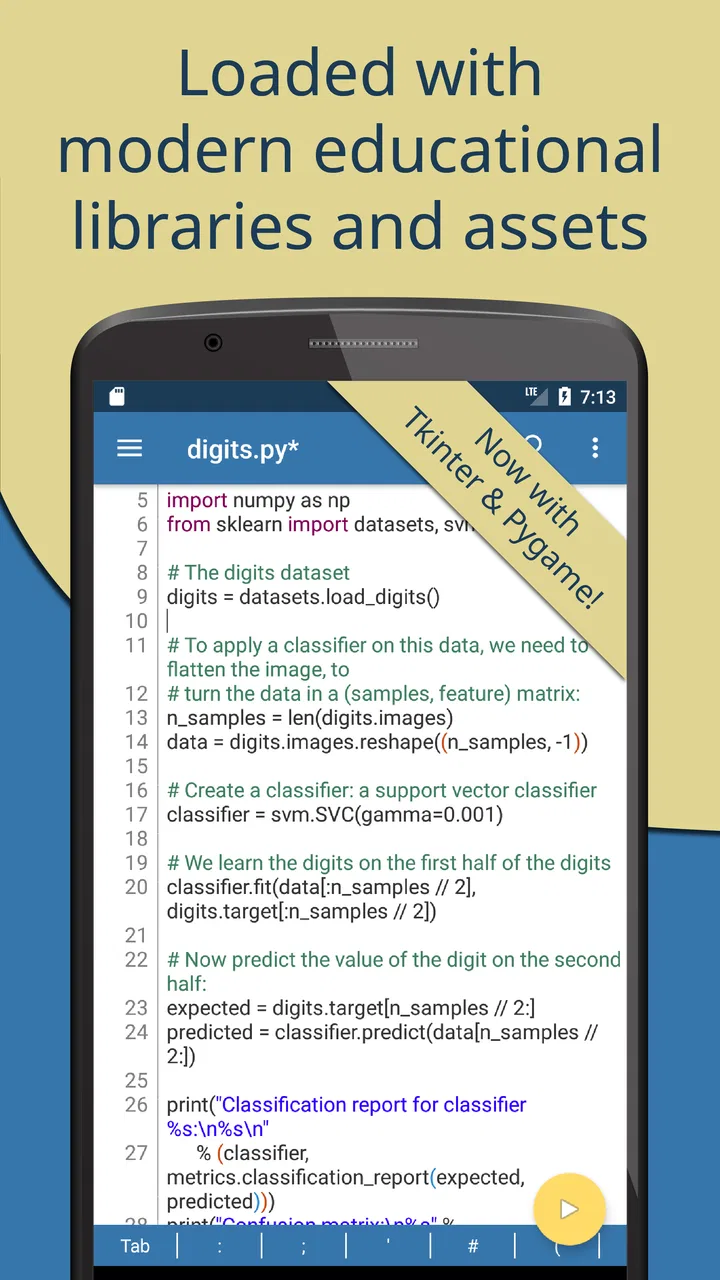
When I want to practice Python away from a desktop, I find Pydroid 3 most useful as a compact learning and experimentation space rather than as a complete replacement for a computer. It is an Android education app from Lider Soft KZ, built around running Python 3 code and working with it in an IDE-style environment. The basic app is free, it is rated for Everyone, and its popularity is easy to understand: it has passed ten million installs, with a 4.4 average from around seventy-nine thousand ratings.
That combination makes it appealing to students, beginners, and curious programmers who want to test an idea immediately. I can open a phone, write a short script, run it, change one line, and try again without setting up a laptop. At the same time, the mobile format creates real compromises. A phone keyboard is not ideal for long programs, screen space becomes limiting as files grow, and people who need a full professional development workflow will probably be happier elsewhere.
What using Pydroid 3 feels like in practice
The first thing I notice is that the app removes much of the distance between thinking about Python and actually executing Python. Instead of reading a lesson and waiting until I reach a computer, I can turn a small idea into a working experiment on the spot. That matters when learning programming because the most useful feedback often comes from making a tiny change, running it, and seeing exactly what happened.
You May Also Like

 Pandora - Music & Podcasts
Pandora’s Music Is Easy to Start, but Harder to Recover
Pandora’s strength is its low-effort path from a seed to a station. Its weak spot is how much confidence it asks you to place in connection, setup, and quiet recovery.

 AccuWeather: Weather Radar
AccuWeather Review: A Quick, Clear Forecast for Everyday Decisions
For everyday plans, the best forecast is the one you can understand quickly. AccuWeather makes rain timing, radar, and local conditions easy to act on, with a few trade-offs.

 Hill Climb Racing
Why Hill Climb Racing Still Turns Crashes Into One More Run
A tiny car, a bumpy hill and one more upgrade: Hill Climb Racing keeps resurfacing because its simple chaos makes every near-miss feel personal.

 AliExpress - Shopping App
AliExpress Makes Global Shopping Feel Personal, but Shoppers Bear the Risk
AliExpress turns a global marketplace into a pocket-sized discovery engine. Its reach is useful, its shopping loop compelling, and its trade-offs easy to miss.

 Lords Mobile: Kingdom Wars
Lords Mobile Is a Kingdom-Building Routine, Not a Quick Match
A case-by-case verdict on the building, battles, device demands, and social commitments that make Lords Mobile rewarding for some players and exhausting for others.

 PDF Scanner app - TapScanner
TapScanner Makes Paperwork Easier to Capture, Check, and Share
TapScanner makes scanning with a phone feel less like a rescue operation and more like a dependable step in getting work done. Its capture tools are useful, though not flawless.
More From Our News Desk
View All News


I would recommend starting with very small programs: a calculator, a text formatter, a number guessing exercise, or a script that organizes information pasted into the editor. These projects fit the phone format and make errors easier to understand. Writing a large application immediately is less comfortable, especially if the code requires frequent navigation between several files.
The app belongs firmly in the education category, but I do not see it as a guided Python course by itself. It gives me a place to write and run code; it does not replace a structured curriculum, patient explanations, or practice exercises. A beginner who expects step-by-step lessons may need a separate learning resource beside it. Used together, though, a tutorial and an always-available interpreter can make a strong combination.
For someone deciding whether it is suitable, the key question is not simply whether they want to learn Python. It is whether they want to learn by actively typing and testing code on an Android device. If the answer is yes, the app has a clear purpose. If the person mainly wants videos, quizzes, or visual lessons, a dedicated course app may be a better first choice.
Why the developer and the app’s scale matter to trust
Lider Soft KZ is the developer behind the app, which has been available since November 6, 2017. Its long presence and large user base give me more confidence than I would have with an unknown utility that appeared recently, but popularity is not proof that every user will have the same experience. I still treat the app as a tool that deserves normal privacy and security awareness, especially because programming often involves copied text, credentials, sample files, or personal data.
The public rating is helpful as a broad signal, not as a guarantee. Around one thousand five hundred written reviews sit behind the overall score, so there is enough user feedback to suggest that the general concept works for many people. I would still read recent comments before relying on it for an important project, because Android versions, device keyboards, and package support can affect the experience differently.
The free price lowers the barrier to trying it. There are also in-app purchases ranging from ninety-nine cents to twenty-nine dollars and ninety-nine cents per item. That means I would explore the free experience first and only pay after identifying a specific limitation that an optional purchase solves. I would not assume that paying automatically turns a phone into a desktop development environment.
Controls I would check before doing serious work
Trust is not only about the developer’s name or the number of installs. I pay attention to what the app asks me to do, what I choose to import, and where I place the files I create. Before using it for anything sensitive, I would review the Android permission prompts and the app’s visible settings on my own device. I would not grant access simply because a prompt appears during setup; I would first consider whether that access is necessary for the task in front of me.
This is especially important with an IDE because code and data can look harmless while containing private information. A practice script might include an email address, an API key, a copied database fragment, or a path that reveals personal details. My preferred habit is to create a separate folder containing only learning material, use fake credentials, and remove secrets before pasting code into the editor.
I also keep purchases under my own control. Since the app is free to install but includes paid items, I would check the purchase confirmation screen carefully and use the device’s normal authentication for transactions. If a child is using the app for school, family purchase controls are worth enabling before handing over the phone. The Everyone age rating makes it accessible to a broad audience, but it does not remove the need for an adult to explain safe handling of code and downloads.
Another practical control is backup discipline. I would not assume that a script stored on a phone is automatically backed up, synchronized, or recoverable after an uninstall. For anything I care about, I would export or copy the files to a location I control, then verify that the copy opens correctly. This is a simple step, but it prevents a learning project from becoming a frustrating recovery exercise.
Where privacy concerns become practical rather than theoretical
The most sensitive moment is often not opening the editor; it is bringing outside material into it. A beginner may paste code from a forum, download a package, or copy a spreadsheet into a script without noticing that the content contains personal information. I would use Pydroid 3 with sanitized examples whenever possible. Names can become placeholders, real tokens can become dummy strings, and private files can be replaced with small invented samples.
Network-related scripts deserve extra caution. If I am experimenting with a request, I would avoid using a real account until I understand exactly what the code sends and receives. A short script can transmit more than expected if it contains the wrong endpoint, headers, or file path. The app makes running Python convenient; that convenience should not encourage me to test unknown code against a live service.
Package installation is another point where I slow down. A package can be useful, but I would first check its name, purpose, and source rather than installing whatever a copied tutorial mentions. On a small screen, it is easy to miss a spelling difference or misunderstand a command. I would also avoid running code I do not understand with broad file access or network behavior, particularly when the script came from an untrusted source.
These precautions are not a criticism unique to this app. They are more noticeable here because the entire development loop is concentrated on a personal phone. The device may contain photos, messages, documents, and saved accounts, so I prefer a clean project folder and deliberately limited examples. The safest workflow is to treat every imported script and data file as something to inspect before running.
Small workflows that make the mobile format worthwhile
One of my favorite uses is the five-minute experiment. I might be waiting somewhere and want to understand list slicing, dictionaries, loops, or a regular expression. Instead of postponing the question, I create a tiny file, print intermediate values, and change one part at a time. This is more effective than passively reading syntax because the result gives immediate evidence about what Python is doing.
A second useful workflow is offline revision. Before a class or interview, I can rewrite short examples from memory: a function with a default argument, a loop over a dictionary, or a simple exception handler. Running those examples exposes gaps quickly. I would not use this method for memorizing isolated rules; I would use it to rehearse patterns that I expect to write under pressure.
A third, less obvious use is data cleaning with deliberately tiny samples. Suppose I have a list of inconsistent product labels or dates. I can create a miniature version with ten invented rows, write the transformation, and inspect the output before applying the idea on a computer. The phone is well suited to testing the logic, while a desktop remains preferable for handling a large or sensitive real dataset.
I also find it useful for debugging explanations. When a tutorial gives an example that feels unclear, I can reproduce it line by line and add print statements around the confusing part. That turns the app into a private scratchpad for questioning lessons rather than merely copying them. The important habit is to keep experiments short and name them clearly, because an unorganized collection of files becomes difficult to search on a phone.
Where Pydroid 3 is weaker than a desktop setup
The biggest limitation is input. Touch typing is slower and more error-prone than using a physical keyboard, particularly with indentation, brackets, quotation marks, and punctuation. A Bluetooth keyboard improves the situation considerably, but it also makes the setup less spontaneous. For a long coding session, I would choose a laptop or desktop without hesitation.
Screen size creates a second trade-off. A short script is comfortable enough, but reading several related files, comparing output, and navigating a larger project can feel cramped. If I need version control, a polished debugger, team collaboration, or a carefully managed virtual environment, a conventional computer-based IDE is the better tool. Pydroid 3 is strongest when the goal is learning, testing, or making a focused utility rather than maintaining a large codebase.
I would also be careful about expecting every desktop-oriented Python workflow to behave identically on Android. Mobile operating systems have their own file locations, background limits, and device differences. A script that depends on a particular desktop environment may need adjustment. That is not a reason to avoid the app; it is a reason to treat it as an Android coding environment instead of pretending it is a full laptop in miniature.
Compared with browser-based coding tools, the app feels more personal and immediate because I can work directly on the device. A browser alternative may be better for sharing a project, moving between devices, or following a collaborative lesson. Compared with a simple text editor, Pydroid 3 is much more useful because it is designed around executing Python rather than merely storing text. Compared with a complete desktop IDE, it gives up comfort and scale in exchange for portability.
Who should use it, and who should choose something else
I think it is a good fit for a student who wants to practice Python during short gaps in the day, a beginner who learns through experimentation, or a developer who needs a quick place to test a small idea. It can also suit a teacher demonstrating a compact example from an Android device, provided the lesson does not depend on a large project or private classroom data.
I would be more cautious recommending it to someone who plans to build a substantial application entirely on a phone. The work may be possible in some cases, but the typing, navigation, storage, and testing friction can outweigh the convenience. A person who already owns a laptop should generally use the laptop for serious development and keep this app for quick tests, revision, and travel.
It is also not the right choice for someone who wants a completely passive learning experience. The app gives me room to practice, but I still need explanations and a progression of exercises. Likewise, a user who is uncomfortable reviewing permissions, checking imported code, or managing files should begin with very simple local examples before moving toward packages, network requests, or personal data.
My cautious recommendation
After using it as a mobile Python workspace, I see Pydroid 3 as a practical bridge between learning material and real code. It makes experimentation accessible, and the free entry point means I can test whether mobile programming suits me before spending anything. Its 10M+ installs and 4.4 average show that it has reached a substantial audience, but my recommendation still depends on using it for the right scale of work.
I would install it for short exercises, offline practice, small text-processing experiments, and quick debugging of ideas. I would keep sensitive information out of sample files, review permission prompts, protect purchases, and back up anything important. I would also read the details of any optional paid item before buying it rather than treating in-app purchases as a necessary part of learning Python.
My final view is positive but deliberately limited: this is a useful Android education app for writing and running Python 3, not a substitute for every desktop development tool. If you want an approachable place to turn small programming questions into working experiments, I think it is worth trying. If your priority is large projects, team workflows, or maximum keyboard comfort, I would choose a desktop IDE instead and use this app only as a portable companion.
FAQs for Pydroid 3 - IDE for Python 3
01What is Pydroid 3, and what can I use it for?
Pydroid 3 is an integrated development environment (IDE) designed for Python 3 on Android devices. It allows users to write, run, and debug Python code directly on their smartphones or tablets. This app is ideal for students learning Python, hobbyists working on small projects, or professionals who need to test code on the go.
02Does Pydroid 3 support all Python libraries and modules?
Pydroid 3 supports many popular Python libraries, including NumPy, SciPy, and Matplotlib, among others. However, due to the limitations of mobile devices, not all libraries and modules may be available or fully functional. It's recommended to check the app's documentation or forums for specific library support.
03Is Pydroid 3 suitable for beginners in programming?
Yes, Pydroid 3 is very suitable for beginners. It offers a user-friendly interface, helpful tutorials, and an interactive Python environment that makes learning programming accessible. New users can easily experiment with code and see results in real-time, making it an excellent tool for educational purposes.
04Are there any in-app purchases or ads in Pydroid 3?
Pydroid 3 offers a free version with basic features, which includes ads. There is also a premium version available for purchase that provides an ad-free experience and additional features such as offline documentation, more libraries, and enhanced support. Choosing the premium version can enhance usability, especially for advanced users.
05How does Pydroid 3 handle code execution and performance on mobile devices?
Pydroid 3 uses a built-in Python interpreter to execute code, allowing for real-time results on mobile devices. While performance is generally good for typical Python scripts, complex or resource-intensive programs might run slower compared to desktop environments due to hardware limitations. It's designed to balance functionality with the constraints of mobile technology.
Pros
- User-friendly interface for beginners.
- Includes a built-in Python 3 interpreter.
- No internet required to run code.
- Comprehensive library support available.
- Supports external libraries and packages.
Cons
- Limited debugging tools for complex projects.
- Some features require a paid subscription.
- Occasional performance lags on older devices.
- Lacks built-in tutorial or learning resources.
- Limited support for other programming languages.

Pydroid 3 - IDE for Python 3
Gallery